Free Biweekly Paycheck Budget Template
Paid every other Friday? A monthly budget doesn't match how your money comes in. This free spreadsheet plans one paycheck at a time. It shows which check pays which bill, and how much is left to spend until your next payday.
Free. No sign-up, no email, no bank login. Works in Excel 2019 or newer and Microsoft 365, and you can upload it to Google Sheets.
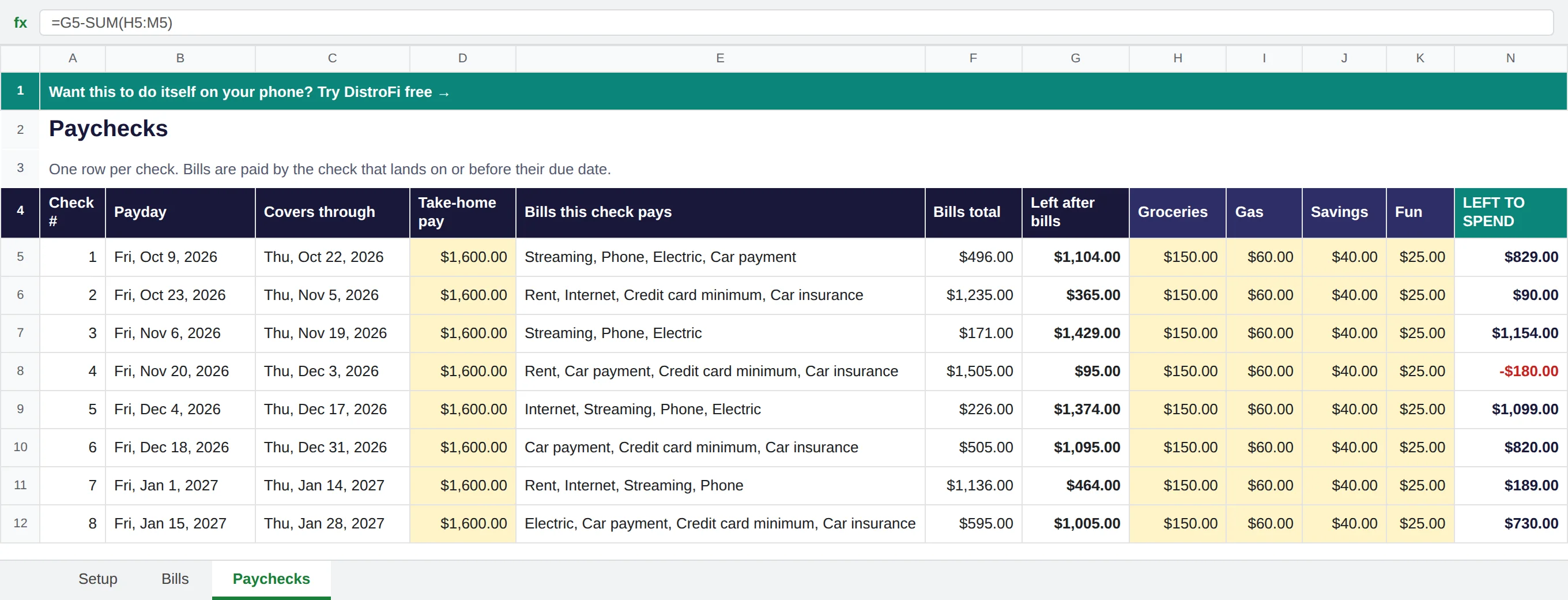
The Paychecks tab with the example numbers. Swap in your own pay and bills.
What's inside
- Which check pays which bill. List each bill once with the day it's due. The sheet gives it to the paycheck that lands on or before that day.
- Left after bills, for every check. See the tight check coming weeks before it gets here.
- Simple envelopes. Groceries, Gas, Savings and Fun to start. Rename them or add your own.
- Left to spend. One clear number for each check. If a check comes up short, it turns red.
It's set up for every two weeks. Paid weekly or twice a month? Pick that on the Setup tab and it adjusts.
Example. You take home $1,600 every other Friday, and rent is $1,000 on the 1st.
Your October 23 check pays rent, internet, your card minimum and car insurance, so only $365 is left after bills. Your October 9 check only has $496 in bills, so it has room to spare. Now you know before payday, not after.
How to use it
- Get your copy. Download it for Excel, or copy it into your own Google Drive. It's yours to change.
- Fill in the yellow cells. Your take-home pay, how often you're paid and a payday. Then your bills, each with its amount and due day. The example numbers are there to show how it works, so swap in yours.
- Open the Paychecks tab. Each row is one check: the bills it pays, what's left after bills, your envelopes, and what's left to spend.
Questions
Is the template really free?
Yes. No sign-up and no email. Download it, change anything you like, and share it with whoever you want.
Do I need to link my bank?
No. You type in your pay and your bills. Nothing connects to your bank, in the sheet or in the DistroFi app.
Does it work in Excel and Google Sheets?
Yes. It works in Excel 2019 or newer and Microsoft 365. For Google Sheets, upload the file to your Google Drive and open it with Google Sheets, or use the Copy to Google Sheets button above.
What about a month with three paychecks?
That's just one more row. The third check usually has fewer bills on it, so more of it is left to spend or save.
What if I don't know a bill's due day?
Leave it blank for now. The sheet lists it with a note to add a due day, and no check pays it until you do.
Rather not keep a spreadsheet updated?
DistroFi does this on your phone, free. It plans each paycheck and counts down to payday. With a free account it also reminds you before bills are due. No bank login, ever.
Try DistroFi freeNo account needed to try.
Comparing apps? Read DistroFi vs YNAB: budget by paycheck or by month.